![GTA-Full-white-logo-wo-strapline-RGB.png]](https://www.gta.net/hs-fs/hubfs/Logos/GTA-Full-white-logo-wo-strapline-RGB.png?height=40&name=GTA-Full-white-logo-wo-strapline-RGB.png)
You can check your balance, top-up, sign up for a plan, set up automatic payments, add personal info, and now load share to other GTA prepaid users! See below for further instructions on how to get started.
Getting started with the GTA Pop Up Prepaid Portal
For existing prepaid portal users without a password set up:
1. Enter your GTA prepaid number or email address that you use for the portal. 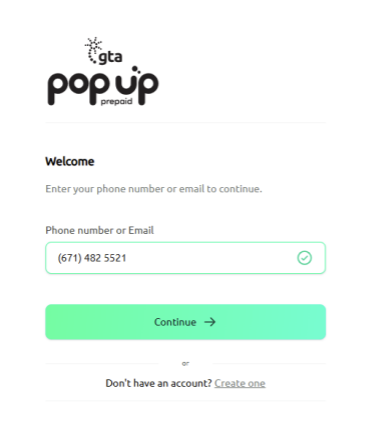
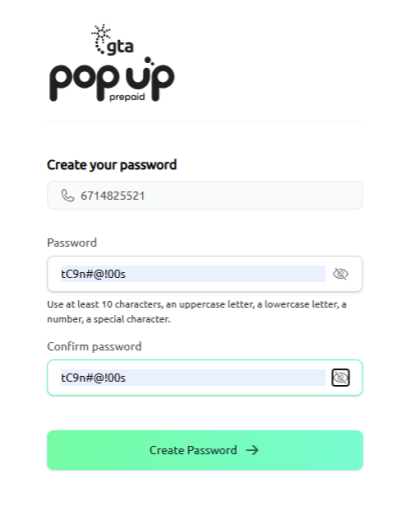
2. You will be prompted to create a password for your account. Once you have inputted and confirmed a password click “Create Password”
3. You can log back in using the phone number or email used to create the account followed by the password you set up. To stay signed on click the check box for “Remember me”. If you have not yet verified your email it is highly recommended to do so as you will not be able to change passwords (clicking “Forgot password?”) unless
the email is verified. 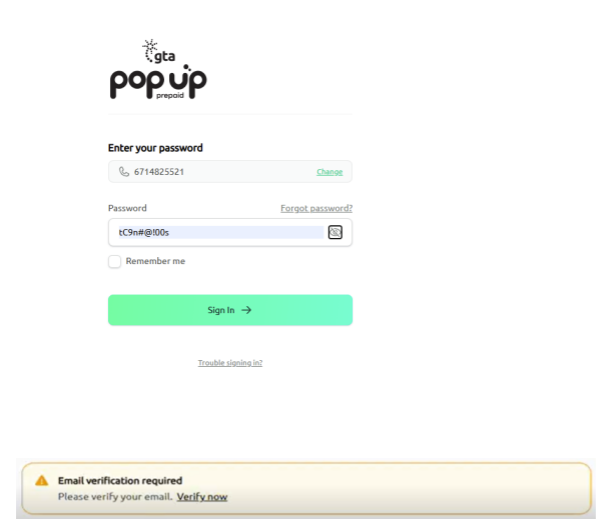
First time registration:
1. When you open https://prepaid.gta.net/ click the “Create one” button. 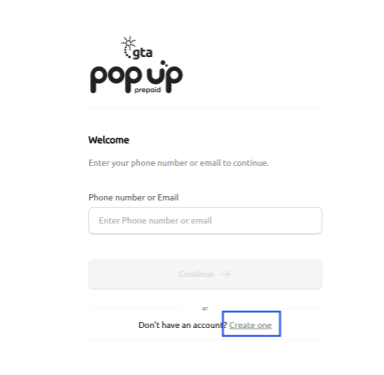
2. You will be prompted to fill out basic account information. Once completed, click “Continue”.
a. First checkmark for Terms and Conditions is required.
b. Second checkmark for marketing emails is optional but recommended. 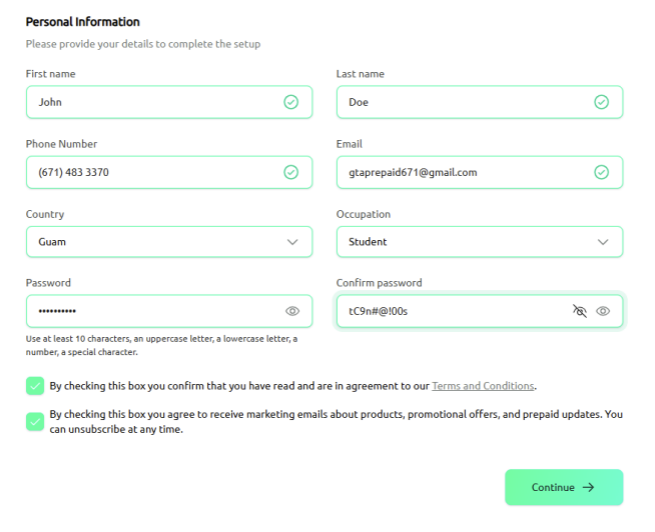
3. You will receive a 6-digit One Time Password (OTP) via SMS to the GTA Prepaid Phone number that you provided. Once the OTP is inputted you will be able to use the GTA Pop Up Prepaid Portal. You can log back in using the phone number or email used to create the account followed by the password you set up. Please also verify your email address once your account has been created. It is highly recommended to do so as you will not be able to change passwords (clicking “Forgot password?”) unless the email is verified.
You may also make changes to your name and email within the web portal after registration.
If you forgot the password you set up:
1. Enter your GTA prepaid number or email address that you use for the portal. 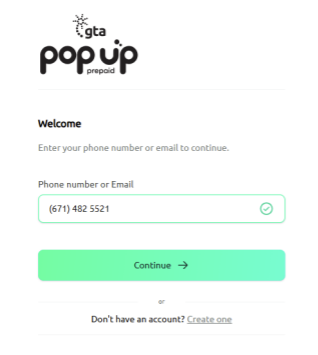
2. Click “Forgot Password”
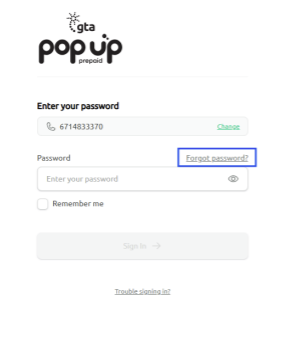
3. Enter the email address you used for the portal.
IMPORTANT NOTE: You cannot change your password unless you verify the email address set up for the portal. This is set up a security protocol to ensure your account is protected.
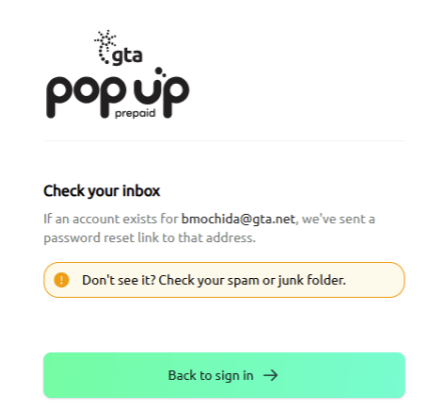
4. On your email click on the “Reset Password” button. 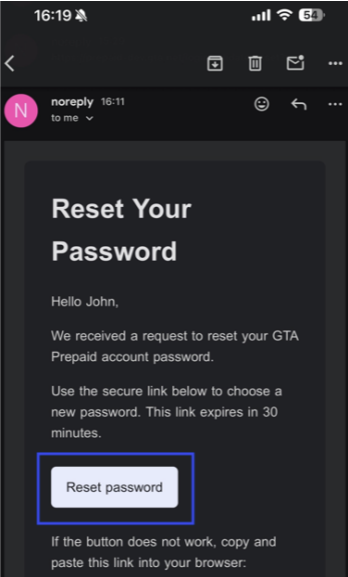
5. Once clicked you will be prompted to create a new password. 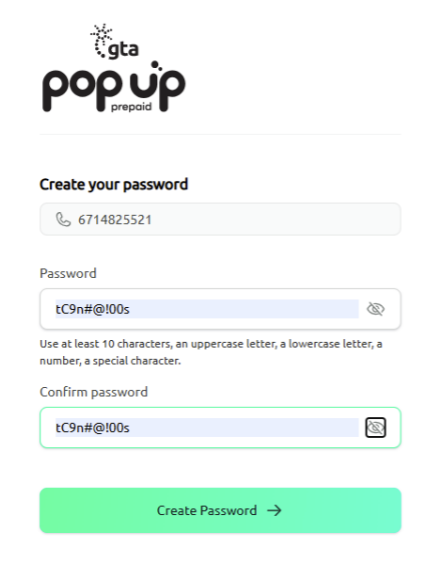
Ways to Purchase Load/Additional Prepaid Balance
- You can add load by using the GTA Pop Up Prepaid Selfcare Portal. Click on the "Top Up" tab and select your payment type.
- You can also add load by texting the TOPUP short code to 2482
-
Text format:
TOPUP [Prepaid Charge Number]
Example:
TOPUP 21955569
-
- Lastly, you can add load by dialing *55 and selecting Option 2 from the voice prompts.
- Prepaid Cards: Prepaid charge cards can be purchased from any gas station, convenience stores, or any GTA retail store.
- Credit Card Top Ups: Customers can use their credit card to purchase GTA Prepaid load through the GTA Pop Up Prepaid Selfcare Portal.
- Prepaid cards expire if the Prepaid Charge Number is not activated before the expiration date found in the back of the card.
How to Transfer load to another GTA prepaid subscriber
- You can transfer load through the GTA Pop Up Prepaid Selfcare Portal. Click the right arrow icon that says share, input the amount you would like to transfer, then input the GTA prepaid number you would like to share load to.
- You can also now save other GTA prepaid phone numbers on your accounts favorites list to easily share load with others. This removes the hassle of needing to remember the recipient’s phone number or having to go through your contacts to find the recipient’s number.
- You can also now save other GTA prepaid phone numbers on your accounts favorites list to easily share load with others. This removes the hassle of needing to remember the recipient’s phone number or having to go through your contacts to find the recipient’s number.
- You can also transfer load by texting the SHARE short code to 2482. Below is an example of what information is needed to transfer/share load with other GTA prepaid subscribers.
- SHARE Phone#ReceivingLoad DollarAmount PIN
- Example: SHARE 6714880000 1 1379
- SHARE Phone#ReceivingLoad DollarAmount PIN