![GTA-Full-white-logo-wo-strapline-RGB.png]](https://www.gta.net/hs-fs/hubfs/Logos/GTA-Full-white-logo-wo-strapline-RGB.png?height=40&name=GTA-Full-white-logo-wo-strapline-RGB.png)
1. Account Summary
Listing of account history, including balances, payments, current charges, and amount due. Account Charges and Adjustments combines handset installments and all account- or item-level charges, credits, discounts, and payments.
2. Total Due
Total amount due and payment due date.
3. Balance Forward
Displays the previous balance, payments received by the date shown, and the remaining balance before new charges are added.
4. HPO, Other Charges, & Adjustments
Shows handset installment charges, accessory purchase, discounts, and other one-time charges.
5. Account Charges & Adjustments
Shows recurring and one-time account-level charges, discounts, credits, and adjustments. Credits to your account are indicated by "CR" next to the amount.
6. GTA News & Notes
Displays important billing notices, reminders, service advisories, and promotional offers.
7. Remittance Information
For mailed payments, please return this section with your payment. Be sure the address shows in the return envelope window. 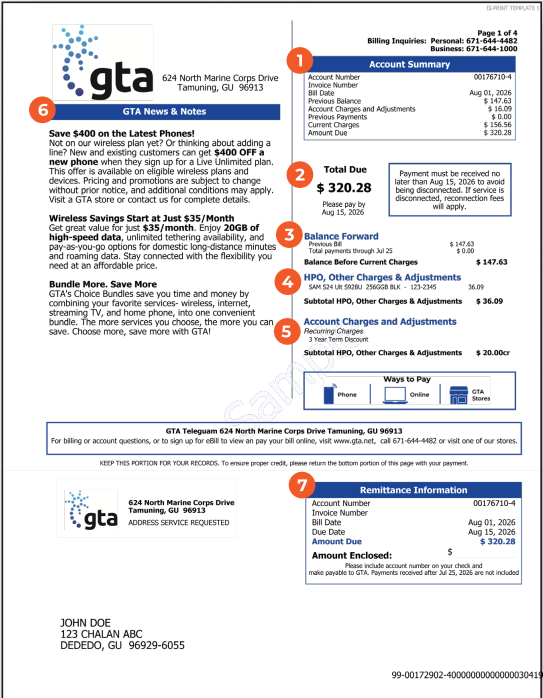
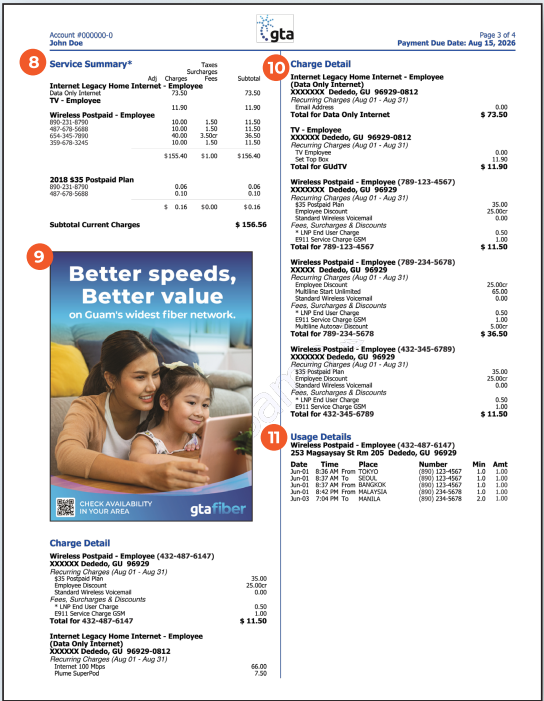
8.Service Summary
Overview of your active services and monthly plan charges.
9.Message Center
Shows the latest deals, promotions, and marketing announcements.
10.Charge Detail
Itemization of charges by service. It will include one-time fees, services added, specific charges, credits or discounts and other applicable fees.
11.Usage
Summary of long distance and roaming charges. For a detailed usage breakdown, including local usage/charges, visit the MyGTA Portal or app. Scan the QR code below to download the app or access the web portal.